
A good renewal reminder email has a clear subject line, five to eight lines of body, and one ask. The eight templates below cover every stage, from the first heads-up to the thank-you after payment. Copy one, replace the words in {curly brackets}, and send.
They work for insurance agents, brokers and mutual fund distributors. Change “policy” to “investment” or “SIP” where it fits. For quick messages on your phone, the same stages are covered in the WhatsApp renewal reminder messages.
Advisend reminds you by email and WhatsApp when each email is due, and can email your customers ahead of the due date. Start free. No card needed. Start free in minutes.
Before you send: 4 quick rules
- Put the policy and the date in the subject line. It is what decides whether the email is opened.
- Sign with your name and number. A client who wants to reply by phone should not have to look for it.
- Ask for one thing. Confirm a date, request the payment link, or book a call.
- Skip the pressure words. “Urgent” and “final notice” make an email feel like a threat.
Fill in the amount and date from your records. If you are not sure what to keep on each policy, see 7 things to record on every policy.
The eight templates
1. The early heads-up (90 days before)
Subject: Your {policy type} policy renews on {Due date}
Hello {Name},
This is a note from {Your name}. Your {policy type} policy with {Insurer} is due for renewal on {Due date}.
There is nothing to do today. If you would like to review the cover before then, reply to this email or call me on {Your number}, and we will set a time.
Regards, {Your name}
2. The planning check (60 days before)
Subject: Anything changed before your {policy type} renewal?
Hello {Name},
Your {policy type} policy renews on {Due date}, about two months from now.
Before it does, has anything changed for you or your family that I should know about? A new member, a new home or vehicle, or a change in income can all affect what cover makes sense.
Reply here or call me on {Your number}.
Regards, {Your name}
3. The amount email (30 days before)
Subject: {Policy type} renewal: {Amount} due on {Due date}
Hello {Name},
A reminder that your {policy type} policy ({Policy number}) renews on {Due date}. The premium is {Amount}.
I can send you the payment link, or help you pay by phone. Just reply and tell me which you prefer.
Regards, {Your name}, {Your number}
4. The one-week reminder (7 days before)
Subject: 7 days left to renew your {policy type} policy
Hello {Name},
Your {policy type} renewal is due on {Due date}. Premium: {Amount}.
Have you been able to arrange the payment? If you would like me to send the link today, reply with a yes.
Regards, {Your name}, {Your number}
5. The due-date email
Subject: Your {policy type} renewal is due today
Hello {Name},
Today is the due date for your {policy type} policy ({Amount}).
If you have already paid, please send me the confirmation and I will update my records. If not, I can help you pay right now. Call me on {Your number}.
Regards, {Your name}
6. After the due date, no reply
Subject: Your {policy type} renewal that was due on {Due date}
Hello {Name},
My records show that your {policy type} renewal due on {Due date} is still pending.
If you have paid, thank you, and please let me know. If not, I would like to help you sort it out today so your cover is not affected. Please call me on {Your number} or reply here.
Regards, {Your name}
Grace periods and lapse rules differ by insurer and product. Check your insurer’s terms before telling a client what happens next.
7. When you could not reach the client
Subject: I tried to reach you about your {policy type} renewal
Hello {Name},
I tried calling you about your {policy type} renewal due on {Due date}.
When would be a good time for a five minute call? You can also reply here and I will help you by email.
Regards, {Your name}, {Your number}
8. The thank-you after payment
Subject: Your {policy type} policy is renewed
Hello {Name},
Thank you. Your {policy type} policy is renewed, and the next due date is {Next due date}.
I have noted it and will remind you well before then. If anything changes in the meantime, I am a call away.
Regards, {Your name}, {Your number}
Keep the sequence on schedule
The templates only help if each one goes out on the right day. The 90-60-30-7 timeline shows when to send which, and the renewal tracker template tells you who is at which stage.
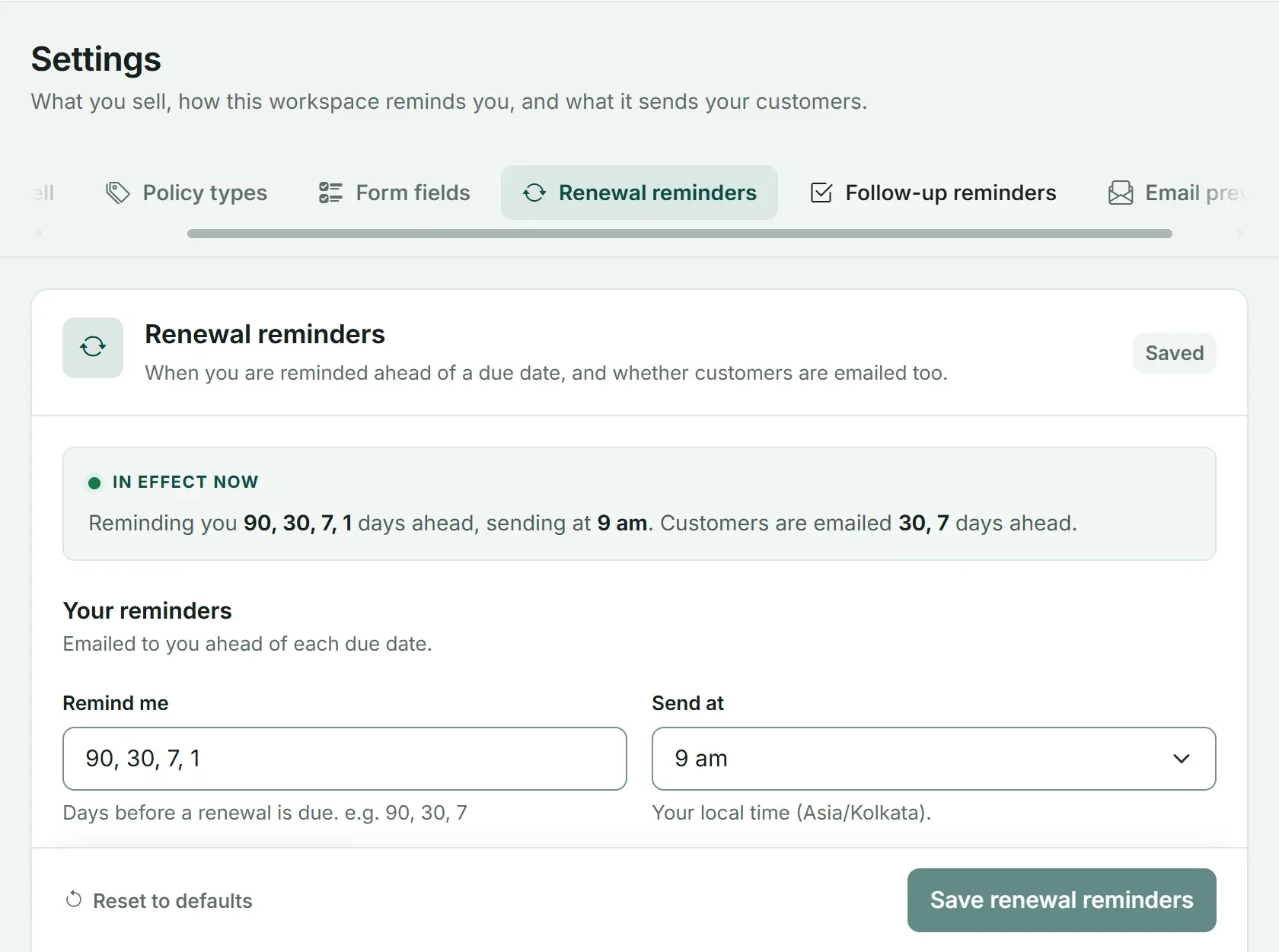
In Advisend you set the days once. It reminds you by email and WhatsApp, and can email your customers ahead of the due date.
You still decide the words. Advisend makes sure the date never slips past you.
See how Advisend handles renewals, or start free. No card needed. Start free in minutes. For the full system around these emails, read Insurance renewal management for agents.
Questions agents ask
What makes a renewal reminder email get opened?
A clear subject line that names the policy and the date, sent from a name the client recognises. Skip words like urgent or final notice, which feel like pressure.
How long should a renewal reminder email be?
Five to eight lines. State the policy, the date and the amount, then ask for one thing. Anything longer belongs on a call.
Can Advisend email my customers for me?
Advisend can email your customers ahead of the due date, on the days you choose in Settings. It also reminds you by email and WhatsApp, so you know who to contact.
One list of what is due and what is late, with reminders sent on the days you choose.
Advisend keeps your renewals in one place and reminds you by email and WhatsApp, so you can spend your day with clients.
Keep reading
10 WhatsApp Renewal Reminder Messages to Copy and Send
Ten ready-to-send WhatsApp messages for every stage of a renewal, from the first heads-up to a client who has gone quiet. Written for insurance agents, brokers and distributors.
Updated 27 Oct 2026GuideThe 90-60-30-7 Renewal Reminder Timeline (With Exact Actions)
What to do 90, 60, 30 and 7 days before a renewal, and on the due date: the exact message, the exact action, and why each step is there.
Updated 27 Oct 2026TemplateInsurance Renewal Tracker in Excel and Google Sheets: Download the Template
A ready-made Excel renewal tracker that counts the days left, colours every policy by urgency and shows who to call today. Works in Excel and Google Sheets.
Updated 27 Oct 2026