
The 90-60-30-7 timeline is a fixed rhythm of contact before each renewal. At 90 days you give a heads-up, at 60 you check for changes, at 30 you share the amount, and at 7 you close the loop. On the due date you confirm, and after it you follow up the same week.
The point is simple. A single reminder a week before the due date leaves no room for a client who is travelling, short of cash, or unsure whether to renew. Spreading the contact removes the panic.
Advisend can send you a reminder on each of these days, by email and WhatsApp, so you do not have to count back from the due date. Start free. No card needed. Start free in minutes.
The timeline at a glance
90 days before: the heads-up
Goal: put the date on the client’s mind without asking for anything.
Action: send one short message. Mention the renewal date and offer a review of the cover if they want one.
Keep it light. There is nothing for the client to do yet, and that is what makes it welcome. For wording you can copy, see the WhatsApp renewal reminder messages or, for email, the renewal reminder email templates.
60 days before: check for changes
Goal: find out whether anything has changed before the renewal is locked in.
Action: ask one question. Has anything changed for the client or the family, such as a new member, a new city, a new vehicle or a change in income?
This is also the best moment to discuss changes to the cover. At 7 days it is too late for a calm conversation.
30 days before: share the amount
Goal: turn awareness into a plan to pay.
Action: send the premium amount, the due date and how to pay. Offer to share the payment link or to help the client pay.
Add a line asking which day suits them. A specific day beats “I will pay soon”.
7 days before: close the loop
Goal: make sure the payment is in motion.
Action: send a short nudge asking whether they have paid or when they will. If the client has not replied to the 30-day message, call now.
If the client mentions a problem, such as a bank issue or a missing document, you still have a week to solve it.
On the due date: confirm
Goal: get a clear yes or no.
Action: message in the morning. If they have paid, ask for a screenshot and update your record. If not, offer to help right away.
After the due date: follow up in the same week
Goal: not to let a missed date turn into a missed policy.
Action: send a polite message the day after and call within a few days. Grace periods and lapse rules differ by insurer and product, so check your insurer’s terms before telling a client what happens next.
A worked example: one client, start to finish
Take a client, Sunita ji, whose health policy is due on Thursday 15 October 2026. Here is her timeline.
| Send on | Days before | Step | What you do |
|---|---|---|---|
| Fri 17 Jul | 90 | Heads-up | Short message: the date, and an offer to review the cover |
| Mon 17 Aug | 60 | Check for changes | Ask whether anything has changed for her or her family |
| Tue 15 Sep | 30 | Share the amount | Send the premium and offer the payment link |
| Thu 8 Oct | 7 | Close the loop | Ask when she will pay. Call if she has not replied |
| Thu 15 Oct | 0 | Confirm | Check it is paid, update your record, thank her |
Notice the second row. Counting back 60 days lands on Sunday 16 August. A reminder on a Sunday is easy to miss and may feel intrusive, so move it to the next working day, Monday 17 August. Check each date against the calendar and shift weekend or holiday dates by a day.
Now imagine it going slightly off. Sunita ji replies at 30 days that she will pay “next week”. You write down “pay by 8 Oct” as the next step. At 7 days you are not chasing a vague promise. You are asking about a date she gave you. That small difference is what the timeline is built to create.
When the client says they will not renew
Sometimes the answer is no. It is easy to treat that as a failure, but handled well it is useful information.
- Ask why, once, and listen. Price, a poor claims experience, a change in circumstances, or a better offer elsewhere are common reasons.
- Offer one option, not five. If the issue is cost, you might ask whether a change in cover or payment frequency would help. Do not pressure.
- Record the reason. Write it against the policy. Over a few months, the pattern shows you what to fix.
- Leave the door open. Thank them, and note a date to check in again. Circumstances change.
A client who leaves respectfully can come back. A client who felt pushed will not.
Running the timeline for many clients at once
With 40 or more renewals a month, each client is on a different day of the sequence. You cannot rebuild the schedule by hand every morning. Three habits keep it manageable.
- Batch by day. Do all the 90-day heads-ups on one fixed day each week, and all the 30-day amount messages on another. It is faster to write the same kind of message together.
- Work from a sorted list. Sort by due date, and let the list tell you who is at 7, 30, 60 or 90 days. Do not rely on memory for this.
- Handle exceptions separately. Clients who need a call or a changed schedule get a note against their row, so they do not get lost in the batch.
Adjust the rhythm to the client
You do not need the full sequence for every client.
| Client type | Suggested contact |
|---|---|
| Long-term client who pays on time | 30 days and 7 days only |
| Client who often pays late | The full sequence, plus a call at 7 days |
| Client who may switch insurer or change cover | Start at 90 days and talk at 60 |
| New client on the first renewal | The full sequence, plus a thank-you after payment |
How to run the timeline without losing track
A timeline is easy to describe and hard to keep up with for fifty or a hundred clients. Each client sits on a different day of the sequence, so you need a list that sorts by date.
- In a spreadsheet: use the renewal tracker template. Filter the Status column to see who is at 7, 30, 60 or 90 days.
- In Advisend: set your reminder days once, and you are reminded by email and WhatsApp before each renewal.
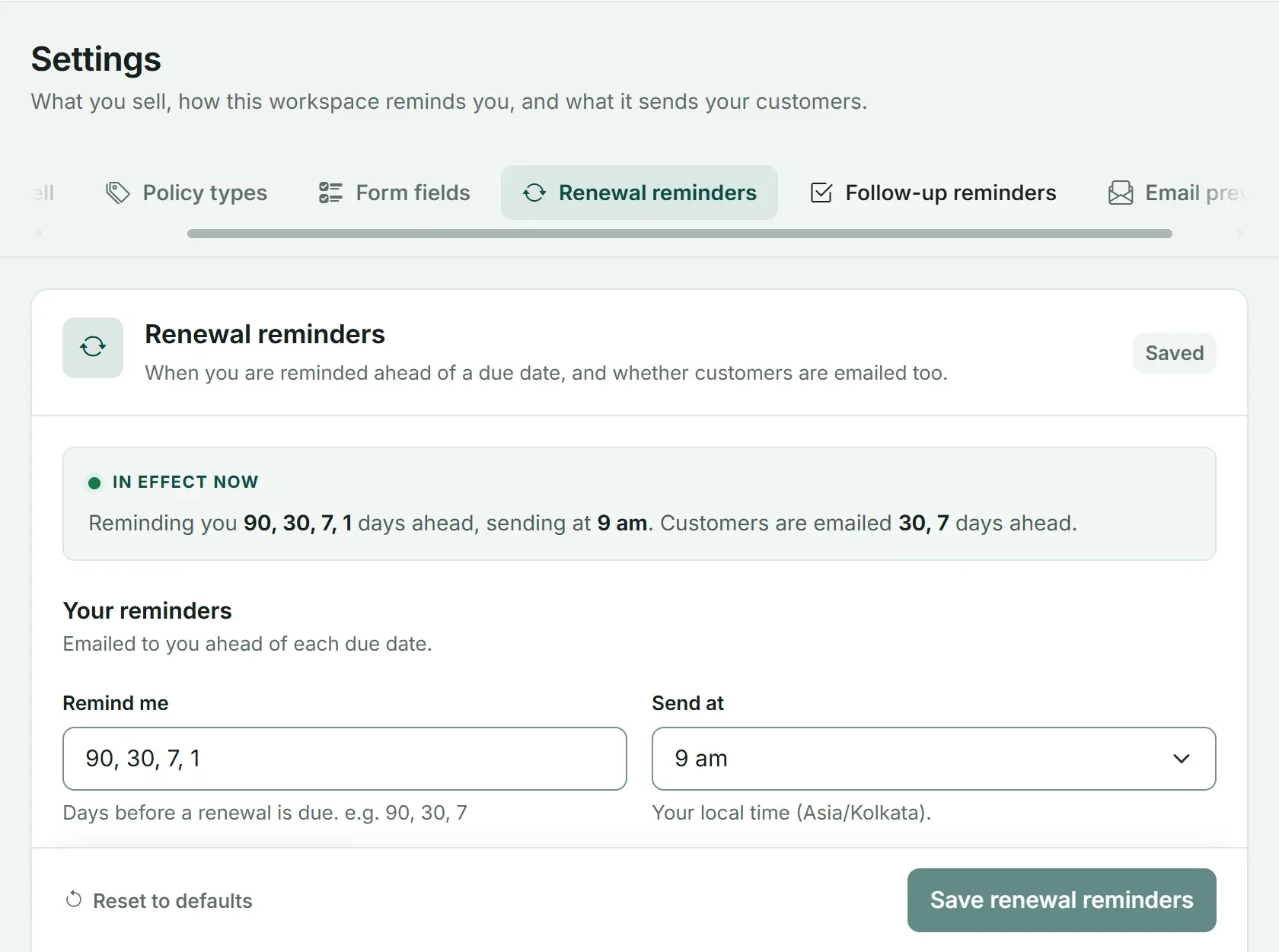
Reminder settings in Advisend: you choose the days ahead and the time of day. Customers can also be emailed ahead of the due date.
The days are yours to change. If your clients need more time, add a 120-day reminder. If a 60-day check feels like too much, drop it.
To see the whole renewals view, visit Advisend for renewals, or start free and set your own days. No card needed. Start free in minutes.
What to record so each step has something to work from is in 7 things to record on every policy. The wider routine is in How to track insurance renewals without missing a single one and the full system in Insurance renewal management for agents.
Questions agents ask
Why 90, 60, 30 and 7 days?
These are a practical rhythm, not a rule. 90 days gives the client time to think about changes, 60 and 30 move them toward paying, and 7 is the last easy moment to fix a problem such as a bank issue. You can change the days to suit your clients.
What if my client always pays on their own?
Send the 30-day and 7-day messages only. A short note is still worth it, because it confirms you are watching the date and gives them a chance to raise a change.
What if a reminder date falls on a weekend or a holiday?
Move it to the nearest working day. A reminder sent on a Sunday is easy to miss and can feel intrusive. Check the dates against the calendar when you plan the sequence.
Should I send all five reminders to every client?
No. Clients who always pay on time may need only the 30-day and 7-day messages, while those who often pay late need the full sequence plus a call. Match the rhythm to the client.
Can I set these reminder days in Advisend?
Yes. You choose the days, for example 90, 30, 7 and 1, and the time of day. Advisend reminds you by email and WhatsApp, so you know who to contact.
One list of what is due and what is late, with reminders sent on the days you choose.
Advisend keeps your renewals in one place and reminds you by email and WhatsApp, so you can spend your day with clients.
Keep reading
10 WhatsApp Renewal Reminder Messages to Copy and Send
Ten ready-to-send WhatsApp messages for every stage of a renewal, from the first heads-up to a client who has gone quiet. Written for insurance agents, brokers and distributors.
Updated 27 Oct 2026Template8 Renewal Reminder Email Templates for Agents (Subject Lines Included)
Eight ready-to-send renewal reminder emails with subject lines, from the first heads-up to a thank-you after payment. Copy, fill in the blanks and send.
Updated 27 Oct 2026GuideHow to Track Insurance Renewals Without Missing a Single One
The four ways agents track renewals, where each one breaks, and a simple daily and weekly routine that keeps every due date in front of you.
Updated 27 Oct 2026