
A renewal tracker is a sheet with one row per policy, the due date, and a column that tells you how many days are left. The template below does the date maths for you and colours every row by urgency, so the policies that need a call today are impossible to miss.
Would you rather the reminder came to you than open a sheet every morning? Advisend sends renewal reminders by email and WhatsApp. Start free. No card needed. Start free in minutes.
What is inside the template
The tracker has 13 columns. You type in 11 of them. The sheet fills in two: Days left and Status. Not sure what to put in each column? See 7 things to record on every policy.
| Column | What goes there | Why it helps |
|---|---|---|
| Client name, Mobile | Who to call | The number you dial when a renewal is close |
| Policy number, Insurer, Policy type | The policy itself | Find any policy in seconds with search or filter |
| Premium | The amount due | You can quote it in your reminder |
| Renewal due date | The date the premium is due | Drives everything else |
| Renewed? | Yes or No | Marks the job done and greys the row |
| Days left | Filled in by the sheet | Counts down every day |
| Status | Filled in by the sheet | Overdue, Due in 7, 30, 60 or 90 days |
| Last contacted, Next action, Notes | Your follow-up record | Never ask a client the same thing twice |
Set it up in 5 steps
- Download and open the file. Delete the three sample rows first.
- Add your policies. One row each. Type the due date as a normal date.
- Leave Days left and Status alone. They are formulas.
- Filter the Status column to Overdue, then Due in 7 days, to get today’s call list.
- Set Renewed? to Yes once the client has paid. The row turns grey.
Use the renewal tracker in Google Sheets
The Google Sheets version is the same tracker, with the same Days left and Status formulas, drop-down lists and colour rules.
- Click Make your own copy of the Google Sheets renewal tracker. Google asks you to sign in and saves the copy to your own Drive.
- Delete the three sample rows. Then add your policies, one row each.
- Open it on your phone with the Google Sheets app, so you can check what is due between meetings.
Already have the Excel file? Upload it to Google Drive and open it with Google Sheets. It works the same way. A Google Sheet is easy to share with a partner or an assistant, but share it only with people who should see your clients’ details.
How the formulas work
Days left is the due date minus today:
=IF(G2="","",G2-TODAY())Status turns that number into a label:
=IF(G2="","",IF(H2="Yes","Renewed",IF(I2<0,"Overdue",IF(I2<=7,"Due in 7 days",IF(I2<=30,"Due in 30 days",IF(I2<=60,"Due in 60 days",IF(I2<=90,"Due in 90 days","Later")))))))The colours come from conditional formatting on the Status column: red for overdue, amber for the next week, softer shades for 30, 60 and 90 days, grey for renewed.
A 10-minute weekly routine
A tracker only works if you open it. Pick a fixed time, such as Monday morning:
- Filter Status to Overdue. Call each client today.
- Filter to Due in 7 days. Send a short message, then call if there is no reply. You can copy one from the WhatsApp renewal reminder messages.
- Filter to Due in 30 days. Send the premium amount.
- Update Last contacted and Next action as you go.
The 7-day, 30-day and 60-day labels in the Status column follow the 90-60-30-7 renewal reminder timeline, which says what to send at each stage. If you would rather send email, the renewal reminder email templates cover the same stages.
Where a sheet starts to struggle
A spreadsheet is a good place to begin. Most agents outgrow it for the same reasons:
- It never reminds you. Nothing happens unless you open the file.
- Renewing means retyping. When a client pays, you update the row and enter next year’s date yourself.
- It is awkward on a phone. Editing a wide sheet while you are out meeting clients is slow.
- Conversations get thin. One notes column cannot hold a year of calls and promises.
None of this means you should skip the sheet. It means you should know the signs that it is time for something that works without you opening it.
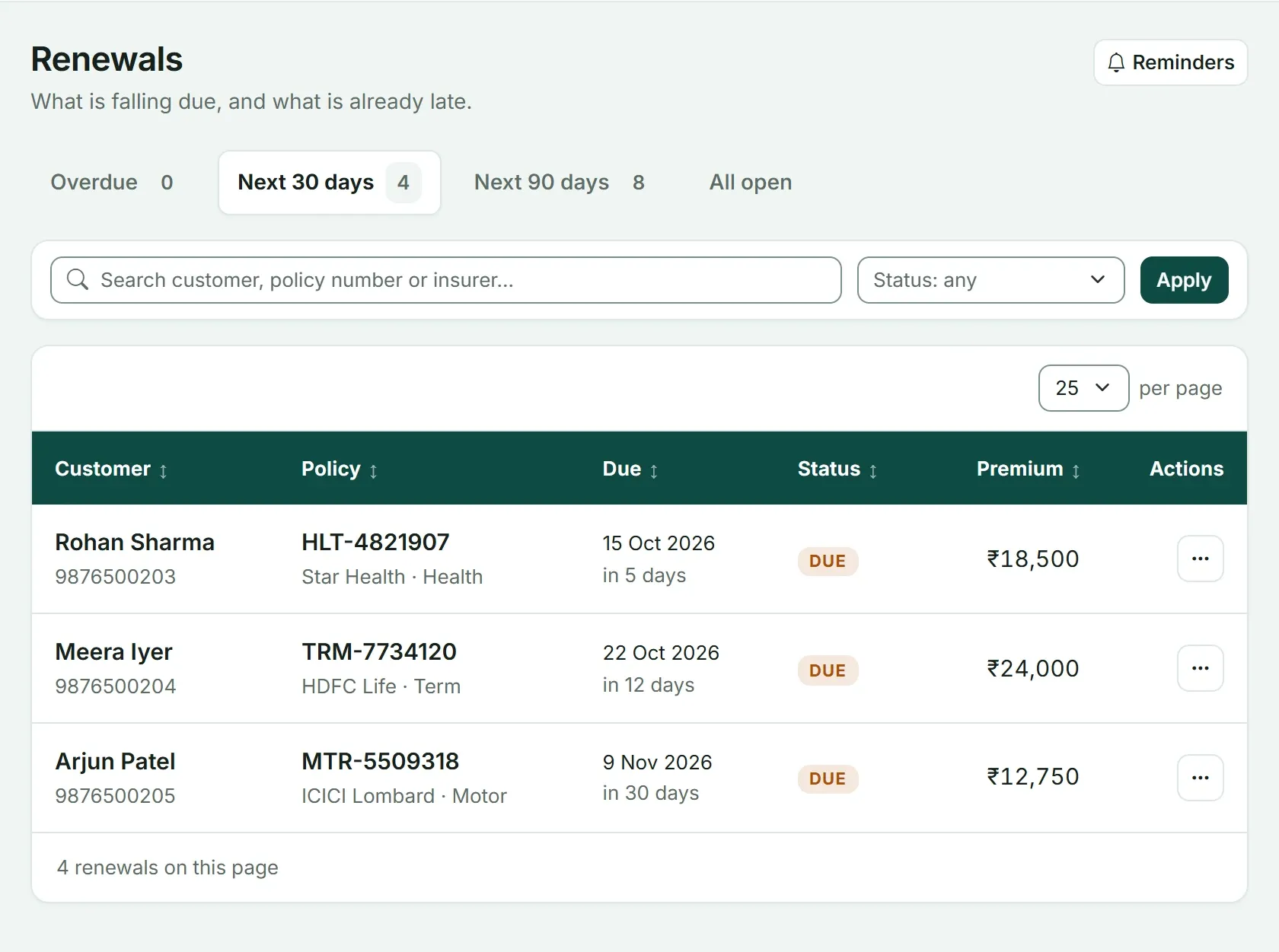
The same job in Advisend: a renewals page with tabs for Overdue, Next 30 days and Next 90 days. Marking a renewal as paid sets the next due date for you, and reminders reach you by email and WhatsApp.
If you want to see the two side by side, read Excel or a renewal reminder app? To see where the tracker fits in a full routine, read Insurance renewal management for agents and How to track insurance renewals without missing a single one.
Tracking leads or clients as well? There is a lead tracker template and a client database template built the same way.
Ready to stop opening a sheet to find out what is due? See how Advisend handles renewals, or start free. No card needed. Start free in minutes.
Questions agents ask
Is there a Google Sheets version of this insurance renewal tracker?
Yes. Make your own copy of the Google Sheets renewal tracker from the section below, or upload the Excel file to Google Drive and open it with Google Sheets. The date formulas, drop-down lists and colour rules all work there.
How many policies can the template hold?
It is set up for 300 policies. To add more, copy the last row and paste it below. The formulas come with it.
Can I use it for SIPs and mutual fund instalments?
You can adapt it. Put the instalment date in the due date column and choose Other as the type. It is built around yearly policy renewals, so you may want to add your own columns.
Does the tracker remind me automatically?
No. A sheet only shows what is due when you open it. Pair it with a daily habit of opening it first thing, or use a tool that sends the reminder to you.
One list of what is due and what is late, with reminders sent on the days you choose.
Advisend keeps your renewals in one place and reminds you by email and WhatsApp, so you can spend your day with clients.
Keep reading
Excel or a Renewal Reminder App? A Side-by-Side for Agents
An honest comparison of tracking renewals in Excel and in a reminder app: what each does well, where each falls short, and how to decide which fits your book.
Updated 27 Oct 2026Template10 WhatsApp Renewal Reminder Messages to Copy and Send
Ten ready-to-send WhatsApp messages for every stage of a renewal, from the first heads-up to a client who has gone quiet. Written for insurance agents, brokers and distributors.
Updated 27 Oct 2026Complete guideInsurance Renewal Management for Agents: The Complete System
A complete system for insurance agents and brokers to track every renewal, remind clients on time, handle the ones who delay, and keep policies in force. With a timeline, templates and a 30-day setup plan.
Updated 27 Oct 2026