
Excel is enough for a small book if you open it every day. A renewal reminder app is better when you want the reminder to come to you, and when marking a policy paid should set the next date by itself. Here is the comparison, task by task, followed by how to decide for your own book.
If you already know you want the reminder to come to you, you can start free with Advisend now. No card needed. Start free in minutes. Otherwise, read on.
Side by side
| Task | Excel sheet | Advisend |
|---|---|---|
| See what is due this month | Sort or filter by date. Works well once the sheet is set up (our template does this) | Renewals page with tabs for Overdue, Next 30 days and Next 90 days |
| Get reminded | You have to open the sheet. Nothing reaches you unless you build your own alerts | Reminders by email and WhatsApp before each due date |
| Choose how early to be reminded | Whatever you build yourself | Set your own days, such as 90, 30, 7 and 1, and the time they are sent |
| Mark a renewal as paid | Edit the row, then type next year’s date | Mark paid, and the next due date is set for you |
| Find a policy fast | Ctrl+F or a filter | Search by customer, policy number or insurer |
| Remind your customers | You message each one yourself | Can email your customers ahead of the due date, on days you choose |
| Keep a record of calls and promises | A notes column | Follow-ups and history sit on each customer and lead page |
| Use on your phone | Spreadsheet apps work but wide sheets are slow to edit | Opens on a phone, and a dedicated mobile app is on our list |
Where Excel is the better choice
Be fair to the sheet. It is a good tool in the right situation:
- You already live in it. There is nothing new to learn, and a familiar tool is one you will actually open.
- You want full control. Any column, any colour, any formula. If your business has an unusual way of tracking things, a sheet bends to fit.
- You work offline a lot. A file on your laptop needs no connection.
- Your book is small. A short list is easy to scan by eye, and the effort of any new tool may not pay back.
- You want to own the file. A spreadsheet is a file you can copy, email to a colleague or keep as a backup.
If most of these describe you, a sheet with a fixed weekly routine is a sound choice. Start from the renewal tracker template so the date maths and colours are done for you.
Where a reminder app is the better choice
- The reminder finds you. The most common way renewals slip is not that you do not know how to track them. It is a busy day on which nobody opened the sheet.
- Paying and renewing is one step. No retyping dates each year, and no chance of typing the wrong year.
- History stays with the client. You see the last call, the promise and the next step on one page.
- You can check it anywhere. A quick look between meetings, without scrolling a wide sheet.
- Lists stay clean. Late and upcoming policies are kept apart, and a one-time premium never lands on your renewal list.
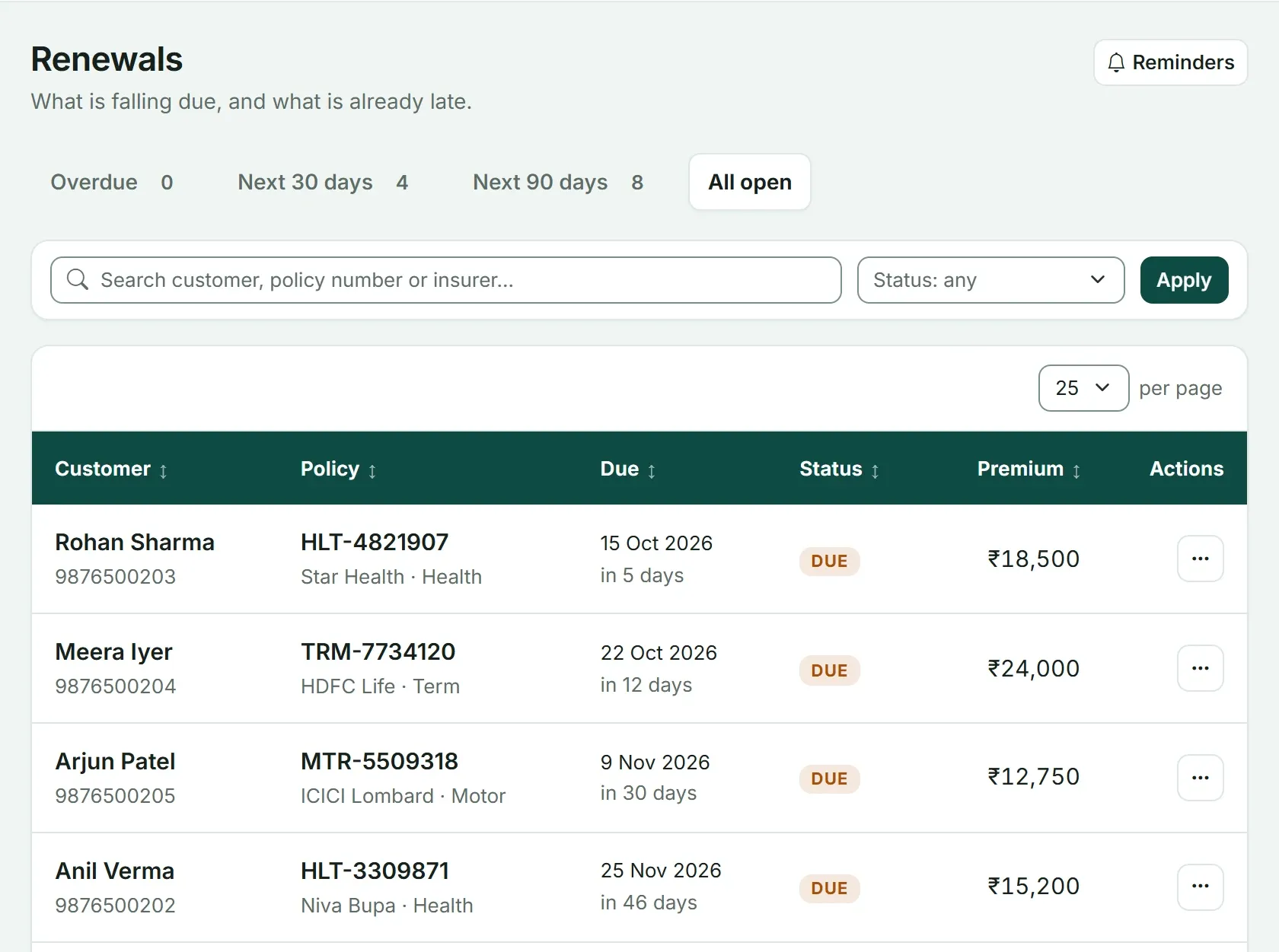
The Renewals page in Advisend. Each row shows the customer, the policy, the due date and how many days are left, and the row menu has Mark paid.
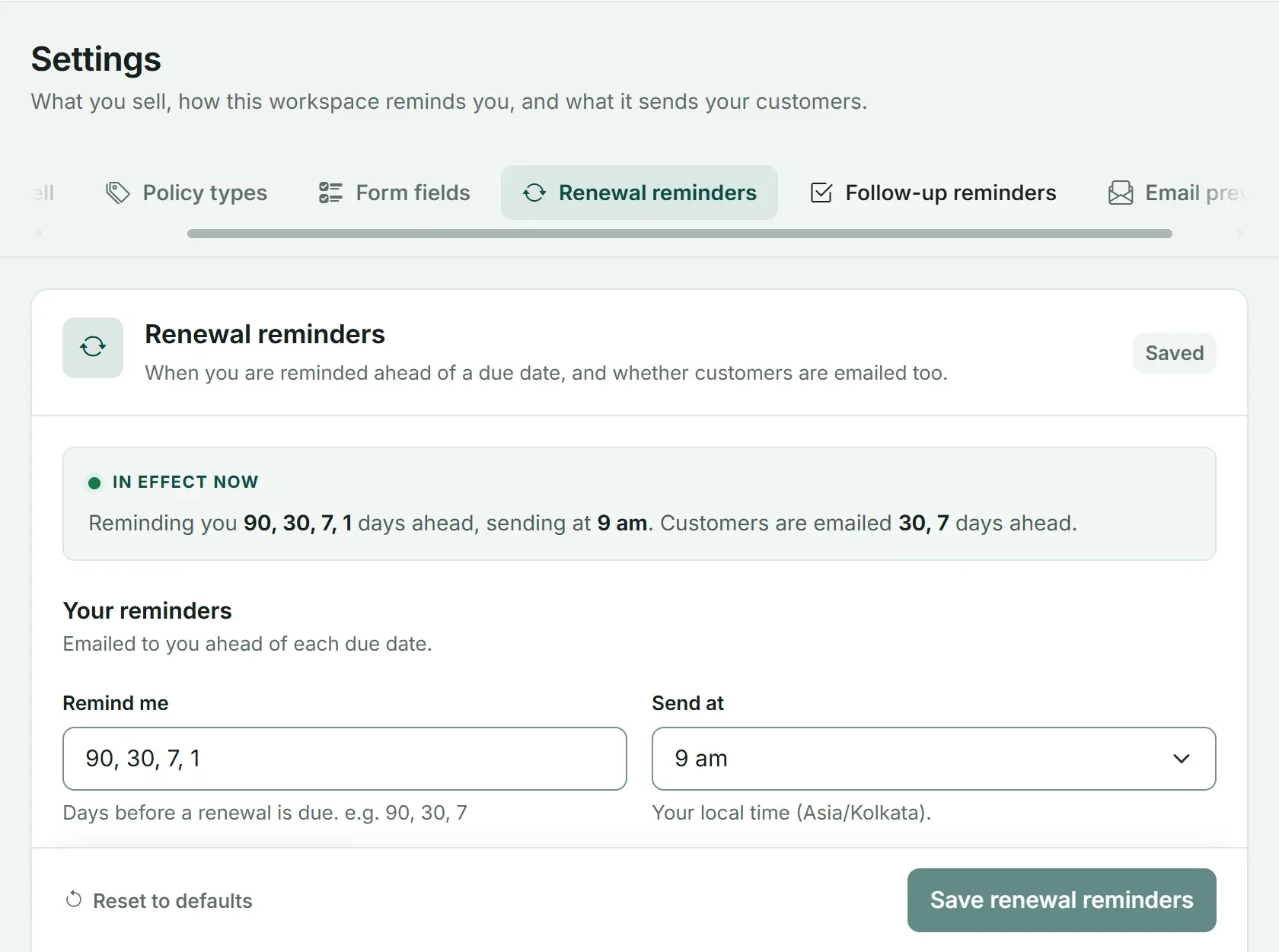
Reminder settings: you pick the days and the time. Customers can also be emailed ahead of the due date.
The reminder days follow the same rhythm as the 90-60-30-7 renewal reminder timeline. You can see the whole renewals page on the Advisend renewals page.
A Monday morning in each setup
The difference is easiest to see on an ordinary day.
With a sheet. You open the laptop and then the file. You filter Status to Overdue, then to Due in 7 days. You call the first clients, update Last contacted by hand, and when someone pays you set Renewed to Yes. The routine works, and it depends on you doing it. If Monday is a bad day, nothing in the sheet will say so.
With an app. The reminder has already reached you by email and WhatsApp. You open the Renewals page, where Overdue is first and Next 30 days sits beside it. You contact the clients, record the follow-up on each customer’s page, and when someone pays you click Mark paid. The next renewal opens by itself.
Both get the same clients called. The second takes fewer steps and does not rely on a good morning. Whichever you pick, the routine behind it is the one in How to track insurance renewals without missing a single one.
What happens when you are away for a week
This is where the two setups differ most. Imagine a week of travel, illness or a family event.
With a sheet, nothing changes while you are away. The list sits waiting. When you return, you open it and find policies that moved from “Due in 7 days” to “Overdue” with no contact in between. You then spend your first days catching up.
With an app, reminders arrive on the days you set, including while you are away. Someone covering for you, or you checking from your phone, can act on them. You still have to do the calling, but you will not return to a surprise.
If you are the only person in your business, this one scenario is often the deciding factor.
The time cost, honestly
A sheet looks free because there is nothing to buy. Its cost is your time. Work it out for yourself with a rough calculation:
- Count the renewals you handle each month.
- Estimate the minutes you spend per renewal on updating dates, statuses and notes.
- Multiply.
For example, if you handle 40 renewals a month and spend 5 minutes on updates for each, that is 200 minutes, or a little over three hours, every month. The number will be your own. The question to ask is whether those hours would be better spent speaking to clients, and what one missed renewal would cost you on top.
An app does not make that time zero, but it removes the steps that are pure copying, such as retyping next year’s date.
Common worries about moving to an app
Agents who stay on a sheet usually have a good reason. Here are the four we hear most, answered directly.
“I do not want to retype everything.” You do not have to on day one. Enter the policies due in the next 90 days first, so the first reminders are useful at once, and add the rest over a few days. Importing a spreadsheet is on our roadmap.
“I am not sure about putting client data into new software.” This is a fair concern. In Advisend, your data stays yours. Everything you add about your clients and leads belongs to you, and it is stored in encrypted form.
“My clients are not good with technology.” They do not need to be. The reminders come to you, and you contact your clients the way you always have, by call, WhatsApp or email.
“A sheet is good enough.” It may be. If you have not missed a renewal and you enjoy the routine, keep it. The test in this post is about evidence, not about changing for the sake of it.
Which fits your book
There is no universal answer, but here is a rough guide. Your habits matter more than the numbers.
| Your situation | A sensible choice |
|---|---|
| A small book, and you open your laptop every day | A sheet with a weekly routine |
| A growing book, and you have missed or nearly missed a renewal | An app, or a sheet only if you add your own alerts |
| A large book, or you work from your phone as much as a desk | An app |
| You are not sure | Run both for two weeks (see below) |
A two-week test
If you cannot decide, test it instead of guessing.
- Day 1. Take the 10 policies due soonest and enter them into the app. Leave your sheet as it is.
- Days 1 to 14. Run your normal routine from the sheet. Also note when the app’s reminders reach you.
- Day 14. Count the renewals each setup caught, the minutes you spent on each, and which one you would rather open tomorrow morning.
If the sheet wins, keep it. If the app wins, move the rest across. Either way, you decided with evidence.
How to decide in 3 questions
- Have you missed a renewal in the last year? If yes, you need a reminder that does not depend on memory.
- Do you spend more time fixing the sheet than calling clients? If yes, you have outgrown it.
- Do you need to check renewals away from your desk? If yes, a sheet on a phone will frustrate you.
If you answered no to all three, keep your sheet and use our renewal tracker template with a fixed weekly routine. If you answered yes to any, try a reminder app. The wider system either one plugs into is explained in Insurance renewal management for agents.
Moving over from Excel
Start with the policies due in the next 90 days, so the first reminders are useful straight away. Then add the rest over a few days. Importing a spreadsheet is on our roadmap, and it will make this step quicker. Keep your sheet as a backup until the first month of renewals has gone through the app without a surprise.
Ready to try it? Start free and enter your next ten renewals. No card needed. Start free in minutes. When the reminders start, the messages to send are ready in the WhatsApp renewal reminder messages and the renewal reminder email templates.
Questions agents ask
Is Excel good enough for tracking insurance renewals?
For a small book, yes. A well-built sheet can show what is due and what is late. Its weak point is that it never reminds you, so everything depends on you opening it every day.
When should an agent move from Excel to a reminder app?
When you have missed or nearly missed a renewal, when you spend more time maintaining the sheet than calling clients, or when you need to check renewals from your phone while you are out.
Does Advisend send WhatsApp reminders?
Yes. Advisend reminds you on WhatsApp as well as by email before each renewal is due. You choose how many days ahead and the time of day.
Can I use both Excel and an app?
You can, but keep one of them as the master list. Two lists that must both be updated will drift apart, and the renewal that slips is usually the one that was only updated in one of them.
Will I lose my Excel data if I switch?
No. Keep the sheet as a backup. Start by entering the policies due in the next 90 days into the app, then add the rest over a few days.
One list of what is due and what is late, with reminders sent on the days you choose.
Advisend keeps your renewals in one place and reminds you by email and WhatsApp, so you can spend your day with clients.
Keep reading
Insurance Renewal Management for Agents: The Complete System
A complete system for insurance agents and brokers to track every renewal, remind clients on time, handle the ones who delay, and keep policies in force. With a timeline, templates and a 30-day setup plan.
Updated 27 Oct 2026TemplateInsurance Renewal Tracker in Excel and Google Sheets: Download the Template
A ready-made Excel renewal tracker that counts the days left, colours every policy by urgency and shows who to call today. Works in Excel and Google Sheets.
Updated 27 Oct 2026GuideHow to Track Insurance Renewals Without Missing a Single One
The four ways agents track renewals, where each one breaks, and a simple daily and weekly routine that keeps every due date in front of you.
Updated 27 Oct 2026