
The easiest way to track insurance renewals without missing one is a single list, sorted by due date, that you open every morning. Anything due in the next 90 days is on it, anything late sits at the top, and every contact is written down.
Agents lose renewals less because they do not care and more because the date lived in the wrong place. This guide shows where each common method breaks and how to set up a routine that does not depend on memory.
If you would rather have the list send the reminders to you, Advisend does that by email and WhatsApp. Start free. No card needed. Start free in minutes.
The four ways agents track renewals
Almost every agent uses one of these, or a mix.
| Method | What works | Where it breaks |
|---|---|---|
| Paper diary | Quick to write, always with you | Hard to search. You turn pages to find next month. Nothing alerts you |
| Phone calendar | Gives an alert on the day | One entry per policy gets messy fast. No premium, no history, no list view |
| Spreadsheet | Sortable, searchable, easy to share | Does not remind you. Needs retyping each year |
| Reminder app | Sends the reminder to you. Renewing sets the next date | Needs a short setup, and you have to enter the policies once |
Each method fails the same way: the day you are busy, nothing pulls the date in front of you. A good setup fixes that.
What a working renewal list needs
Whatever tool you use, the list must do five things:
- Hold every policy in one place. Not half in a diary and half in a sheet.
- Show the due date and how many days are left.
- Separate late from upcoming. Overdue policies should never hide among the rest.
- Record the last contact and the next step.
- Reach you without being opened. The list should tell you, not wait for you.
If your current method misses any of these, that is where renewals will slip. What to put on each row is covered in 7 things to record on every policy.
A routine you can keep
A list is only as good as the habit around it. This one takes about ten minutes a day and thirty minutes a week.
Every morning (10 minutes)
- Open the list. Look at Overdue first.
- Contact the clients who are due in 7 days or less, by message or call.
- Mark every renewal that has been paid.
- Write down what you did and what happens next.
Every week (30 minutes)
- Look 30 days ahead. Send the amount and payment route to everyone due.
- Look 90 days ahead. Send the heads-up to anyone who has just entered that window.
- Check that nothing sits in “pending” without a next step.
For the exact days and what to say at each one, use the 90-60-30-7 timeline. Messages you can copy are in the WhatsApp renewal reminder messages and the renewal reminder email templates.
What a filled-in list looks like
Here is a small slice of a working renewal list. The names are made up, and the status is what you would see on 12 October.
| Client | Policy | Due date | Days left | Status | Last contact | Next step |
|---|---|---|---|---|---|---|
| Meera Iyer | Term, HDFC Life | 22 Oct | 10 | Due in 30 days | Messaged 8 Oct | Send the amount on 15 Oct |
| Rohan Sharma | Health, Star Health | 15 Oct | 3 | Due in 7 days | Called 10 Oct | Call again on 13 Oct |
| Arjun Patel | Motor, ICICI Lombard | 9 Nov | 28 | Due in 30 days | None yet | Heads-up this week |
| Anil Verma | Health, Niva Bupa | 25 Nov | 44 | Due in 60 days | None yet | Check for changes on 25 Oct |
| Kabir Shah | Health, Care Health | 30 Nov | 49 | Due in 60 days | None yet | Check for changes on 30 Oct |
| Divya Rao | Term | 28 Sep | -14 | Overdue | Called 1 Oct | Call today |
Read it from the bottom row up. Divya is overdue and is the first call of the day. Rohan is next, because his date is three days away. Everyone else has a dated next step, so nothing depends on memory.
That last column is the one most lists lack, and it is the one that turns a list into a plan.
Tracking a client who has several policies
Many clients hold more than one policy, for example a health plan, a term plan and a vehicle cover, each with its own due date. Two rules keep this from becoming a mess.
- One row per policy, not per client. The due date belongs to the policy. A single row for a client with three policies hides two of the dates.
- A shared client name and number. When you filter by client, you should see all their policies together. That also helps when a call about one renewal turns into a chat about another.
In Advisend, each policy has its own renewal, and a customer’s page lists their policies together, so you can see all of a client’s dates in one place.
Catching up after a bad week
Everyone has a week when the list goes untouched. The way back is calm and short.
- Filter to Overdue first. Contact those clients today, starting with the longest overdue.
- Then look at the next 7 days. These are the ones that will become overdue if nothing is done.
- Send a catch-up batch. For anyone due in 30 days, send the amount message in one go.
- Write down the next step for every call you make. The point of catching up is to leave the list in a state you trust.
- Do not apologise at length. A short “I tried to reach you” is enough.
One bad week does not break a system if the list tells you exactly where you stand when you return.
Handle each renewal to a clear end
Every policy should end in one of three states. Writing the state down is what stops renewals from fading.
- Paid. Mark it, record the payment date, and set next year’s due date.
- Pending. The client said yes but has not paid. Set a specific follow-up date.
- Lost or switched. Record why. A reason you can see later is useful for the next conversation.
When to move from a sheet to an app
A sheet works for as long as you open it every day. Consider an app when:
- you have missed or nearly missed a renewal
- you spend more time updating the sheet than speaking to clients
- you want to check what is due while you are out of the office
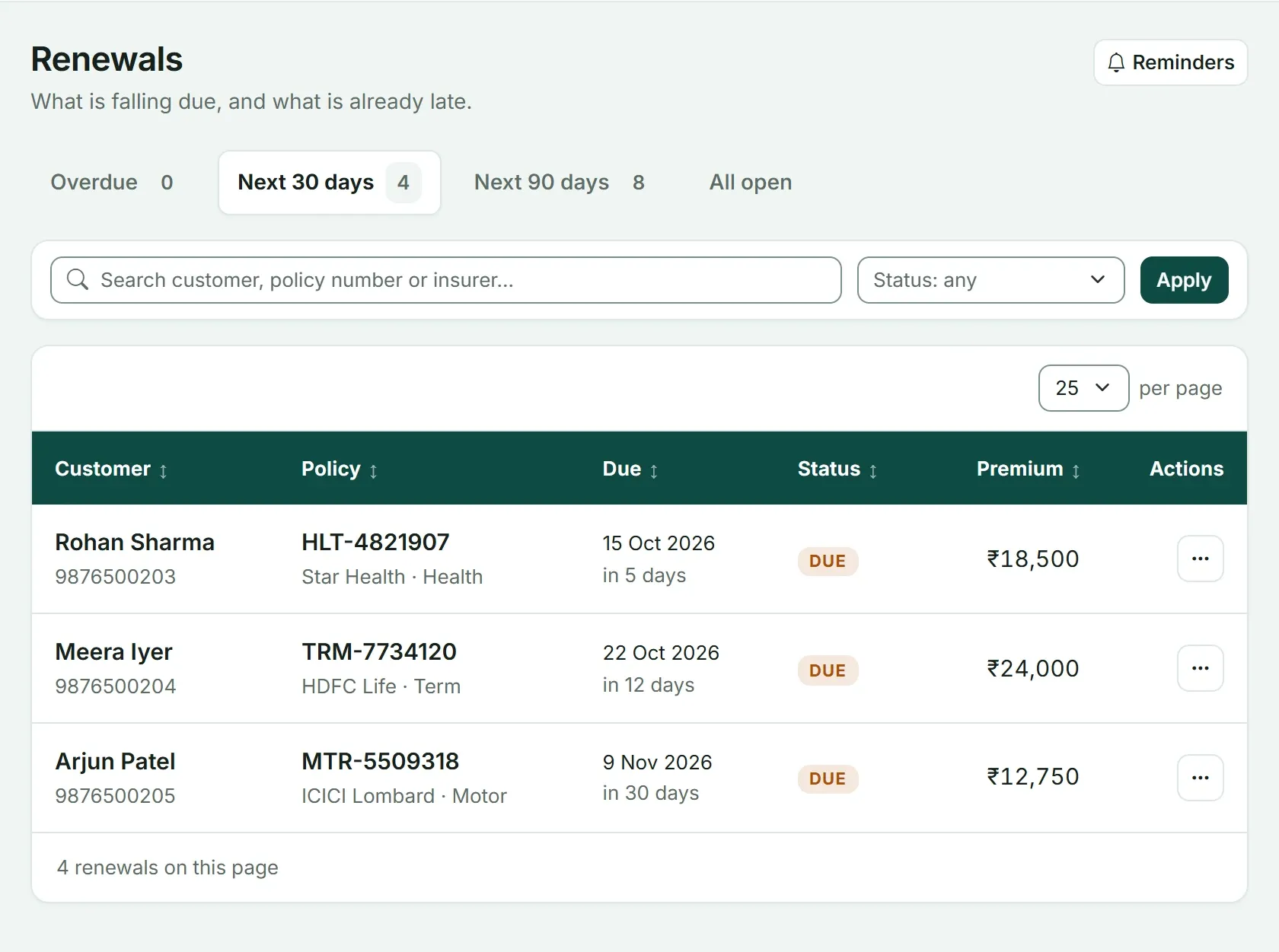
In Advisend, the Renewals page keeps late and upcoming policies apart. You choose the days for reminders, and they reach you by email and WhatsApp.
If you would rather start with a sheet, the renewal tracker template gives you the Overdue and Due-soon colours from day one. The side-by-side is in Excel or a renewal reminder app? The full system this routine belongs to is in Insurance renewal management for agents.
Ready to try an app? See how Advisend handles renewals, or start free and add the policies due in the next 90 days. No card needed. Start free in minutes.
Questions agents ask
What is the easiest way to track insurance renewals?
A single list sorted by due date, checked every morning. It can be a sheet or an app. What matters is that every policy is in one place and the list shows what is due soon and what is already late.
How far ahead should I look at upcoming renewals?
Look 90 days ahead. That window shows everything you will need to contact in the next three months, so no renewal arrives as a surprise.
How do I track a client who has several policies?
Use one row per policy, not one per client, because each policy has its own due date. Share the client name and number across the rows so you can filter all their policies together.
What should I do when a client has not paid by the due date?
Follow up the next day by message and call within a few days. Keep the policy on your list as pending until it is confirmed paid, and record each contact.
One list of what is due and what is late, with reminders sent on the days you choose.
Advisend keeps your renewals in one place and reminds you by email and WhatsApp, so you can spend your day with clients.
Keep reading
Insurance Renewal Tracker in Excel and Google Sheets: Download the Template
A ready-made Excel renewal tracker that counts the days left, colours every policy by urgency and shows who to call today. Works in Excel and Google Sheets.
Updated 27 Oct 2026Guide7 Things to Record on Every Policy So No Renewal Surprises You
The seven details worth writing down for every policy, from the due date to the next action, so a renewal never catches you off guard.
Updated 27 Oct 2026GuideThe 90-60-30-7 Renewal Reminder Timeline (With Exact Actions)
What to do 90, 60, 30 and 7 days before a renewal, and on the due date: the exact message, the exact action, and why each step is there.
Updated 27 Oct 2026